PyTaiko
A TJA player and Taiko simulator written in Python using the raylib library.







Features
- Cross-platform compatibility (Windows, macOS, Linux)
- Controller Support
- Low latency audio via ASIO or WDM-KS
- Recursive Song Select Menu
- 1080p Support (And higher if you give me assets!)
Modes
- 1 Player: Single player mode. Default
- 2 Player: Use both keybinds on the entry screen to access
- Dan Mode: Access by creating a dan dojo folder and placing dan course jsons in it
System Requirements
- Windows: Windows 10 or higher
- macOS: macOS 10.14 (Mojave) or higher
- Linux: Ubuntu 20.04 or higher (other distributions may work but are untested)
Note
: Operating systems below these requirements are not supported.
FAQ
Q: I'm on Windows and my latency is really high!
A: Change your device_type in game settings to WDM-KS, WASAPI, or ASIO if your computer supports it
Q: I want to add more song paths!
A: You can either append new folders:
tja_path = ["/run/media/yonokid/HDD/Games/PyTaiko/Songs", "Songs", "Cool Folder"]
or replace the base one:
tja_path = ["/run/media/yonokid/HDD/Games/PyTaiko/Songs"]
Just make sure to use / and not \!
Q: I'm trying to play on Mac and it can't open!
A: Delete your installation and follow these commands in the terminal:
/bin/bash -c "$(curl -fsSL https://raw.githubusercontent.com/Homebrew/install/HEAD/install.sh)"
curl -LsSf https://astral.sh/uv/install.sh | sh
source $HOME/.local/bin/env
git clone https://github.com/Yonokid/PyTaiko
cd PyTaiko
brew install libsndfile
brew install libsamplerate
cd libs/audio
make
mv libaudio.dylib ../../
cd ../../
uv run PyTaiko.py
Installation
Pre-built Binaries
Download the latest release for your operating system from the releases page.
Windows
- Install the Visual C++ Redistributable from Microsoft
- Run
PyTaiko.exe
macOS
- Run with Python directly (see Building from Source)
Linux
- Try running the compiled
PyTaiko.binbinary - If that doesn't work, fall back to running with Python (see Building from Source)
NixOS
Use the provided shell.nix environment:
{ pkgs ? import <nixpkgs> {} }:
(pkgs.buildFHSEnv {
  name = "PyTaiko-env";
  targetPkgs = pkgs: (with pkgs; [
    python3Full
    gcc
    libGL
    uv
    patchelf
    portaudio
    zlib
    python312Packages.pyaudio
    python312Packages.nuitka
    python312Packages.numpy
    alsa-lib
    xorg.libX11 xorg.libxcb xorg.libXcomposite
    xorg.libXdamage xorg.libXext xorg.libXfixes
    xorg.libXrender xorg.libxshmfence xorg.libXtst
    xorg.libXi
    xorg.xcbutilkeysyms
  ]);
  runScript = "bash";
}).env
Then run with Python as described in the Building from Source section.
Building from Source
Prerequisites
- uv package manager
- Python 3.12+
- Git
C Libraries
sudo apt install libsamplerate libsndfile
Some distributions may also require patchelf and this symbolic link:
sudo ln -s /lib/libatomic.so /lib/libatomic.a
Build Steps
- Clone the repository:
git clone https://github.com/Yonokid/PyTaiko
cd PyTaiko
- (Optional) Compile audio libraries:
cd libs/audio
make
# Move compiled libraries to main directory
You can also reuse the DLLs/libraries from the pre-built releases. This step is required for MacOS.
- Run the game:
uv run PyTaiko.py
Creating Executables
Windows/macOS/Linux
uv add nuitka
uv run nuitka --mode=app --noinclude-setuptools-mode=nofollow --noinclude-IPython-mode=nofollow --assume-yes-for-downloads PyTaiko.py
Controls
- Press F1 during gameplay for quick restart
- Press ESC during any screen to go back
- Generic drum keybinds can be customized in
config.tomlor through the in-game settings menu
Contributing

Contributions are welcome! Please keep in mind:
- Be mindful of existing built-in functions for animations, videos, and other features. Nearly everything has been abstracted and the libs folder has proper documentation for usage.
- You can also check the DeepWiki page for a detailed explanation of any code.
- Check the issues page for enhancements and bugs before starting work
- Feel free to open new issues for bugs or feature requests
Known Issues
See the issues page for current bugs and planned enhancements.
License
This project is licensed under the terms specified in the LICENSE file.
Acknowledgments
Built with raylib - A simple and easy-to-use library to enjoy videogames programming. More credits coming soon
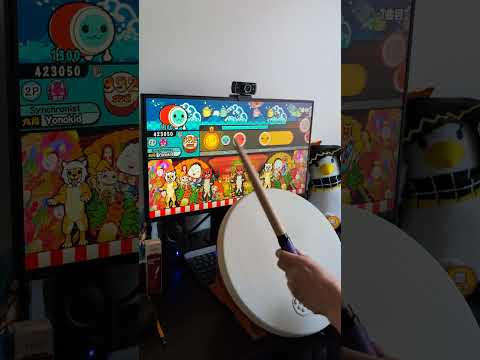
Video demo